
Fairview LINK is a secure, HIPAA compliant web portal you can use to approve your orders and review medication details, 24/7.
All specialty, transplant and diabetes care patients are automatically enrolled. If you opted out of the service or haven’t received Fairview LINK messages, just give us a call. We’ll send you a text message with an invitation to start using your personal message feed.
Access the service through your smart phone – no download required.
 icon and then tap "Add bookmark".
 icon right of the address bar and then tap the
  icon.
icon.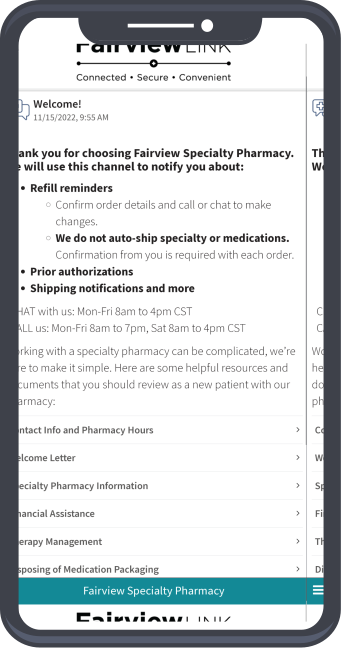

![[object Object]](https://specialtypharmacy.fairview.org/-/media/MHealthFairview/Project/SpecialtyPharmacyOrg/Footer/facebook.ashx?hash=4D21519DE1494CE397C2A7EF3E2F3C9B)
![[object Object]](https://specialtypharmacy.fairview.org/-/media/MHealthFairview/Project/SpecialtyPharmacyOrg/Footer/instagram.ashx?hash=99D27FBA0A603EC6A56FC3A899A27AD3)
![[object Object]](https://specialtypharmacy.fairview.org/-/media/MHealthFairview/Project/SpecialtyPharmacyOrg/Footer/twitter.ashx?hash=B59687DDFA71C977EA2A792195B67FC1)
![[object Object]](https://specialtypharmacy.fairview.org/-/media/MHealthFairview/Project/SpecialtyPharmacyOrg/Footer/youtube.ashx?hash=98CA6688807968D1D1FC1491DCC79F6E)
